
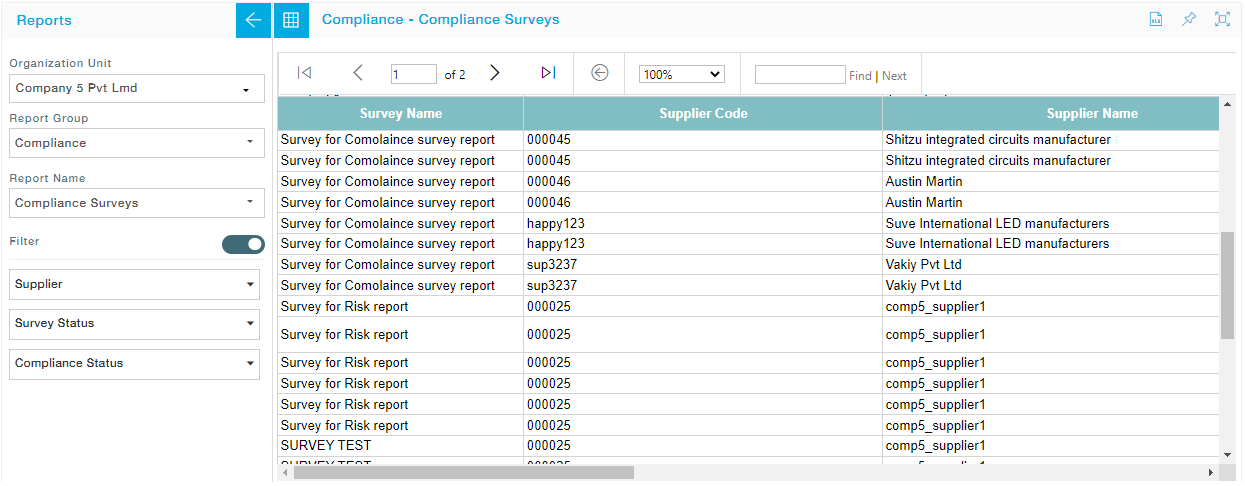
Steps to view a report:
- Select a Report group from the Report group dropdown. Available groups are:
- Compliance
- Integration
- Purchase Orders
- Security
- Supplier
- Workflow Configuration
- Select a Report under the chosen Report group.
- If you wish to apply filter, toggle the Filter slider and choose from the list of available filters.
- Click on “View Report” button. The Report opens in the right-side pane.
- Click on “Export” to export the report contents into either Excel or CSV format. You can also pin the report, and also view it in full screen mode.
| Report Group | Available Reports | Description |
| Compliance | Policy Statement Acceptance History | Report with the list of Suppliers who have accepted/rejected the Policy Statement along with the Policy Revision Number details. |
| Current Policy Statement
|
Report with the list of Suppliers who have accepted/rejected the currently active Policy Statement. | |
| Supplier Compliance Status | Detailed report on the compliance status of the Supplier | |
| Compliance Surveys | Details of the compliance surveys with questions wise compliance response | |
| In-Person Audits | Details of the In Person Audits with questions wise compliance response | |
| Risks | Detailed report on the available list of risks in the Risk Management | |
| Integration | Purchase Order – Mapping | PO integration report details |
| Invoice – Mapping | Invoice integration report details | |
| Contract – Mapping | Contract integration report details | |
| Shipment – Mapping | Shipment integration report details | |
| Purchase Orders | PO Summary | The information regarding purchase orders. Purchase Order Summary Report displays purchase orders without individual product details |
| PO Detail | A detailed report containing all the information regarding PO, Purchasing Order displays the quantity you ordered and received so you can monitor the status of your purchase orders | |
| PO Issues Supplierwise Summary Monthly | The report holds the monthly PO summary of each supplier. Includes the number of POs created for each month along with the Value | |
| PO Issued Supplierwise Summary Quarterly | The report holds the quarterly PO summary of each supplier. Includes the number of POs created for each quarter along with the Value | |
| PO Issued Supplierwise Summary Half Yearly | The report holds the half yearly PO summary of each supplier. Includes the number of POs created for each quarter along with the Value
|
|
| PO Issues Supplierwise Summary Yearly | The report holds the yearly PO summary of each supplier. Includes the number of POs created for each quarter along with the Value | |
| PO Schedule vs Shipped | The report holds the yearly summary of scheduled PO and the shipped PO , along with the delivery delay details | |
| Supplier in Full and On Time Report (SIFORT) by PO | The report is based on the PO against the timely delivery of the supplier
|
|
| SIFORT by Supplier | The report is based on the list of suppliers who have made timely delivery without any delays.
|
|
| Security | Account Unlock History | List of instances of Supplier users unlocking their User accounts along with the Email ID and date and time of unlocking |
| Email Sent | Details of all the emails sent along with the recipients and email contents | |
| User Report Tabular | A tabular report for all users in MeRLIN with one row for every associated role | |
| User Report Matrix | A matrix report combining all users in MeRLIN against all roles. For every applicable role for a user, cell is marked with “Yes”.
|
|
| Supplier | Supplier List | List of Suppliers and their attributes |
| Supplier Address List | List of Suppliers address details | |
| Supplier Bank List | List of Supplier’s Bank Information and Account Information | |
| Supplier Supplying Locations List | List of Supplier’s location, currency and payment terms | |
| Supplier Contact List | List of available contacts along with their details such as Title, Function, Email, Phone, etc. | |
| Workflow Configuration | Current
|
Detailed report on the currently available workflow configurations |
| History | Detailed report on the previously available workflow configurations |