
As the name suggests, New Supplier Evaluation Templates can be created.
Menu Path: Business Administration >> Supplier Evaluation Framework
a)Click on the Create New Definition button.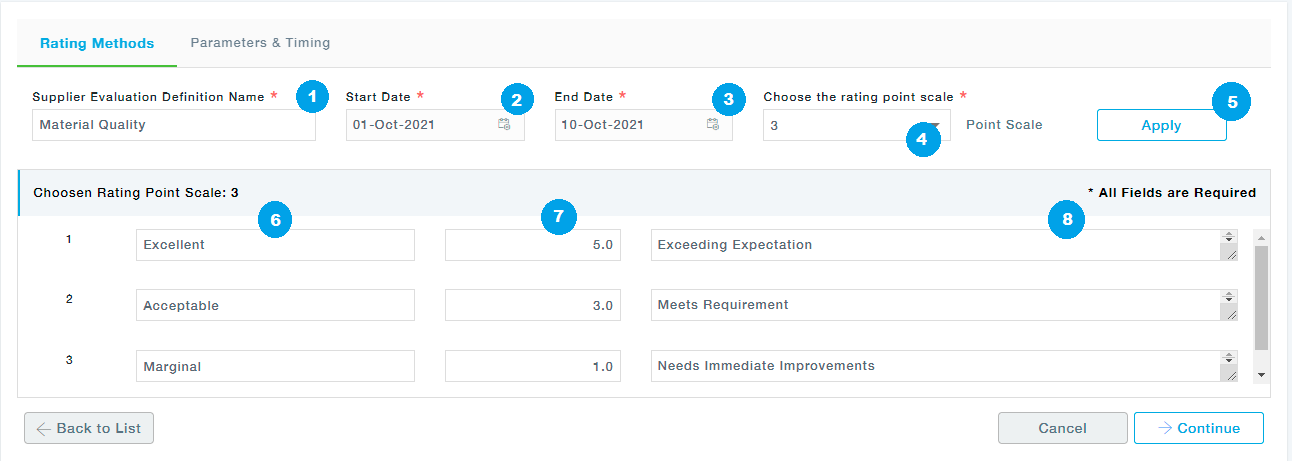
1.Provide the Supplier Evaluation Template name.
2.Select the Validity of the Evaluation Template by providing the Start Date.
3.Select the Validity of the Evaluation Template by providing the End Date.
4.Choose the rating point scale.
5.Click on the Apply button. Depending on the Rating scale chosen, the rating lines will get displayed under the Chosen Rating Point Scale section.
6.Provide the Rating Parameter.
7.Provide the Rating for the defined Rating Parameter.
8.Provide the Description of the Rating parameter defined.
Click on the Continue button to move to the next tab.
b)On the Parameters and Timing tab, click on the Add New Parameter button.
c)Fill in the Details on the Add New Evaluation Parameter pop up window.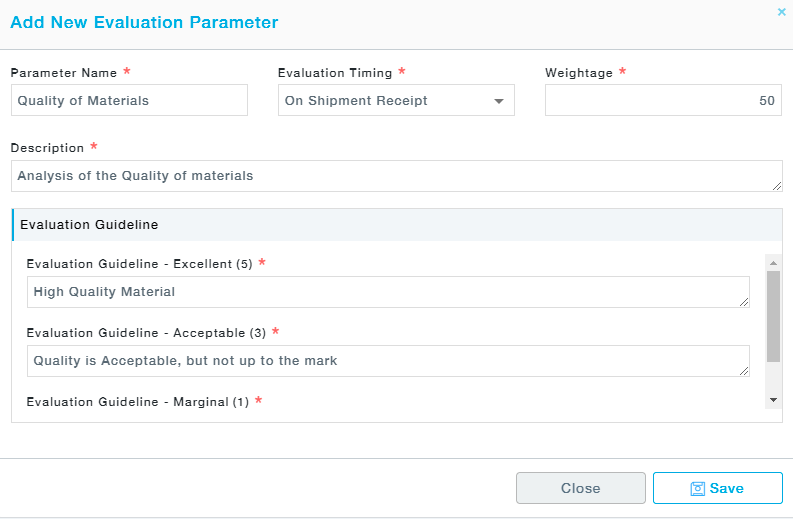
Field Description
Field | Description |
Parameter Name | Name the Parameter of Evaluation |
Evaluation Timing | When the Evaluation is to be performed. |
Weightage | Provide the weightage of the parameter you have juts defined. This defines the weightage of the evaluation parameter. |
Description | Provide in detail the description of the Evaluation parameter |
Evaluation Guideline | Depending on the rating scale you have defined in the Rating Methods tab, the Rating scales will be displayed. You can define appropriate Evaluation guideline for the existing rating scales. |
d)Click on Save.
e)Repeat the Steps b to d to add new evaluation parameters.
f)Click on Save button to Save the details of the Template.